Chess Clock & Time Controls —
Bullet, Blitz & Rapid Explained
Every serious chess game uses a clock. Time controls determine the pace and character of the game — from the adrenaline of 1-minute Bullet to the deep calculation of Classical chess. Chess Arena includes a built-in chess timer for all time controls.
How the Chess Clock Works
- Both players start with the same amount of time on their clock.
- White moves first. White's clock counts down immediately.
- After White makes a move, White presses their clock (or in Chess Arena, this is automatic). White's clock stops and Black's starts.
- This continues — each player's clock only runs during their turn.
- If a player's clock reaches 0:00, they lose on time ("flag"). This is true even if they have a winning position on the board.
- The only exception: if you have no legal moves to checkmate your opponent even with unlimited time, the game is a draw despite the flag.
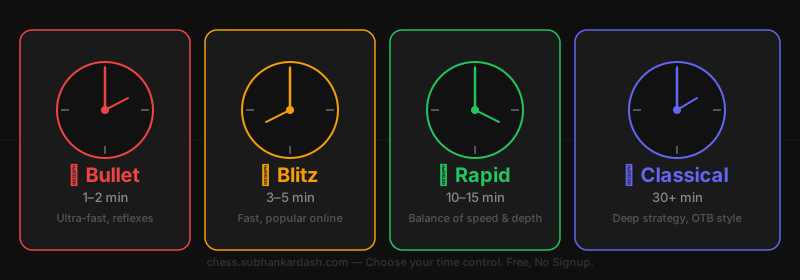
Time Control Categories
Bullet
1 min per playerOne minute per player. Extremely fast — games last under 2 minutes total. Most moves are made on instinct. Flagging (running out of time) is common.
Best for: Experienced players who want an adrenaline rush. Not recommended for beginners.
Blitz
3–5 min per playerFIDE Rated3 to 5 minutes per player. Fast but enough time to think. The most popular format for casual online play. Games are exciting and decisive.
Best for: Intermediate players and above. Great for casual games with friends.
Rapid
10–15 min per playerFIDE Rated10 to 15 minutes per player. Good balance between speed and quality. FIDE recognises rapid as a separate category with its own rating.
Best for: All skill levels. The best format for learning — enough time to calculate but keeps the game moving.
Classical
30+ min per playerFIDE Rated30 minutes or more per player. Time to think deeply. The format used in top-level tournaments (though top events use longer controls with increments).
Best for: Serious games where quality matters more than pace.
What is an Increment?
An increment is extra seconds added to your clock after every move. For example, 5+3 means 5 minutes base time, plus 3 seconds added after each move you make.
Increments prevent "flag" wins in clearly winning positions — if you always move within 3 seconds, your clock never decreases. Top events like the World Chess Championship use formats like 100 minutes + 50 seconds/move.
Frequently Asked Questions
How does a chess clock work?
Each player has their own clock. When you make a move, you press (or tap) your clock, which stops your timer and starts your opponent's. If a player's clock reaches zero, they lose on time (flag).
What is a chess increment?
An increment adds a fixed number of seconds to your clock each time you make a move. For example, 5+3 means 5 minutes + 3 seconds per move. This prevents players from flagging in clearly won positions.
What time control should beginners use?
10 minutes (Rapid) is ideal for beginners. It gives enough time to think about moves without the game dragging too long. Avoid Bullet chess until you're comfortable with the rules and board vision.
Can I win on time even if I'm losing on the board?
Yes. If your opponent's clock reaches zero, they lose — regardless of the position on the board. This is called "flagging". Time management is a real skill in chess.
Does Chess Arena support clock increments?
Currently Chess Arena supports fixed time controls (1, 3, 5, 10, 30 minutes). Increment support is on the roadmap.
What happens if both players run out of time?
In Chess Arena, the first player to flag loses. If both clocks reach zero simultaneously (rare in practice), the outcome depends on position — but generally a draw is awarded.
Pick your time control and play
Create a room, choose your clock, and challenge a friend — free, no signup.