How to Play Chess Online
with Video Chat
Chess Arena lets you play real chess against a friend over a live HD video call — no signup, no app to install. This guide covers everything from creating your first room to using the AI agent and power-ups.
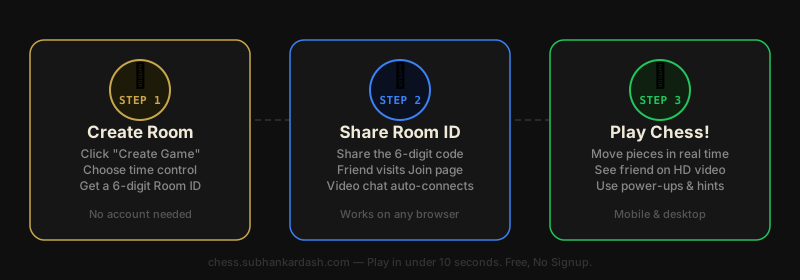
🏛️ Step 1 — Create a Private Room
- Go to the Create Game page.
- Enter a room name (e.g. "sunday-battle") — this appears in the URL shared with your friend.
- Set a time control: choose from 1 minute (Bullet), 3 min (Blitz), 5 min (Rapid), 10 min, or 30 min per player.
- Click Create Room. You'll get a unique Room ID to share.
- Copy the Room ID or the Spectate link and send it to your opponent.
🚪 Step 2 — Join a Room
- Go to the Join Game page.
- Enter the Room Name and the Room ID you received from your friend.
- Enter your display name — this shows on your player card during the game.
- Click Join. You'll enter the room and wait for both players to be ready.
📹 Step 3 — Enable Video Chat
- Once both players are in the room, allow camera and microphone access when prompted by your browser.
- Your opponent's video appears in the right sidebar (desktop) or in the video panel (mobile).
- Tap the camera/mic buttons in the top bar to toggle your video or audio at any time.
- Video runs over WebRTC — peer-to-peer, low latency, no recording.
♟️ Step 4 — Play the Game
- White moves first. Drag a piece or click it then click the destination square.
- Legal moves are highlighted — green for normal moves, yellow for captures.
- Your clock counts down only when it's your turn. Flag (time out) means you lose.
- Move history, captured pieces, and the current evaluation are shown beside the board.
🤖 Step 5 — Use the AI Agent
- Desktop: find the Chess AI Agent panel in the right sidebar.
- Mobile: tap the Bot icon (🤖) in the top bar to open the agent as a bottom sheet.
- Toggle the switch to enable the agent.
- Click "Get Hint" to see Stockfish's best move with a Gemini AI explanation.
- Enable Auto mode to receive a hint automatically every time it's your turn.
- Click "Apply Move" to play the suggested move instantly.
✨ Step 6 — Extra Features
- Power-ups: spend coins to undo a move, add 30 seconds to your clock, or shield yourself from your opponent's power-ups.
- Emoji Reactions: send thumbs-up, fire, or facepalm emojis that your opponent sees in real time.
- Quick Taunts: preset phrases to send during the game.
- Spectate: share the spectate link and let others watch your game live.
- Board Themes & Piece Skins: customize the board appearance from the Settings panel.
- Game Music: toggle ambient music during the game from the Settings panel.
Quick Tips for Better Chess
Pick the Right Time Control
If you're learning, choose 10 or 30 minutes so you have time to think. Bullet (1 min) is for experienced players.
Use the AI Agent to Learn
Enable the agent but try to find the move yourself first. Then compare — it's a great way to spot blind spots.
Spectate to Study
Watch strong players' games via the Spectate page to pick up patterns without pressure.
Control the Centre Early
Place pawns on e4/d4 (or e5/d5 as Black) and develop your knights and bishops before castling.
Castle Early
Castle within the first 10 moves to tuck your king safely away and connect your rooks.
Don't Move the Same Piece Twice
In the opening, develop a different piece each move. Moving the same piece twice wastes tempo.
Frequently Asked Questions
Do I need an account to play?
No. Chess Arena is completely free and requires no signup. Just enter a display name and start playing.
Can I play on mobile?
Yes. Chess Arena is fully responsive. The board, video panel, AI agent, and all controls adapt to mobile screens.
Can strangers join my room?
Only someone with your Room ID can join your room. Share the ID only with who you want to play against.
What happens if a player disconnects?
The game pauses. If the player reconnects within the session their position is restored. Clocks don't run during disconnection.
Can I watch a game without playing?
Yes. Use the Spectate page and enter the room ID to watch any ongoing game live without joining as a player.
Start your first game now
No account needed. Create a room, share the link, and play in under 30 seconds.